
Simplify radiology reporting with variable fields in Eden PACS
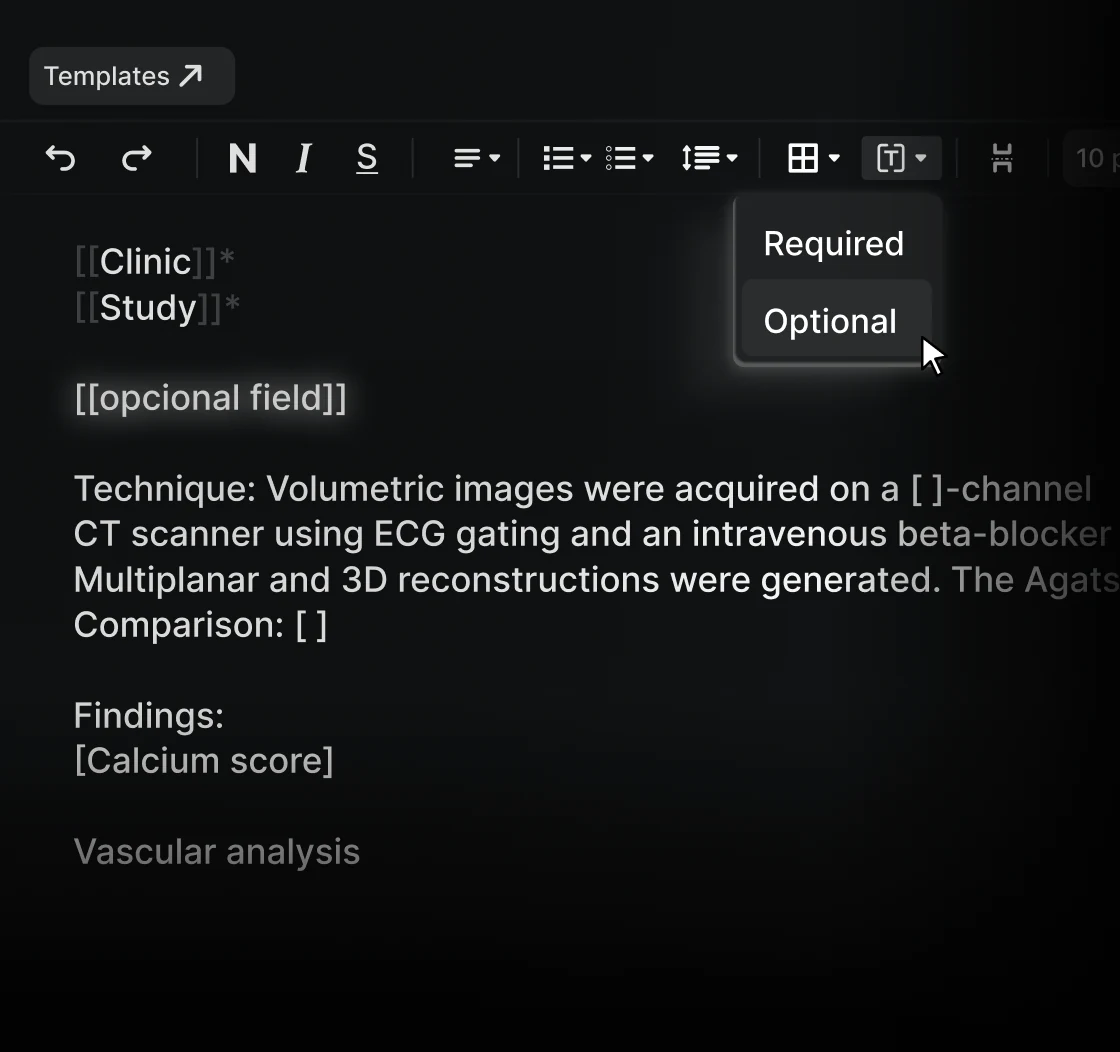
Radiology report templates help standardize documentation and reduce repetitive work. However, certain information, such as measurements, percentages, and clinical findings, must be updated for each patient.
To make this process more efficient, Eden PACS introduces Variable Fields, a feature that allows radiologists to insert and complete customizable fields within report templates, reducing manual editing while maintaining a consistent reporting structure.
What is it?
Variable Fields is a feature within the Eden PACS report editor that allows users to create templates containing predefined fields for information that changes between exams.
Instead of manually locating and replacing values throughout a report, radiologists can complete specific fields while preserving the surrounding text and formatting.
For example, a template might include:
Pulmonary nodule measuring [ ] mm, with [ ]% enhancement.
When the template is inserted into a report, the radiologist only needs to enter the corresponding values.
What is it for?
Variable Fields helps radiologists:
- Reduce repetitive editing by updating only the information that varies between exams.
- Improve reporting accuracy by minimizing the risk of overlooking or incorrectly replacing values.
- Accelerate report completion by navigating between fields using the Tab key, without relying on the mouse.
- Maintain consistency by preserving standardized report structures while allowing patient-specific information.
- Ensure report completeness by preventing reports from being signed until all required fields are completed.
How does it work?
Within the Eden PACS report template editor, users can insert variable fields at specific positions in the text, alongside regular content and formatting.
When a radiologist uses the template to create a report, they can complete these fields directly in the report editor.
The feature includes:
- Customizable templates: Add multiple variable fields within a single template while preserving the surrounding text and formatting.
- Keyboard navigation: Move between fields using the Tab key to complete values quickly and efficiently.
- Seamless editing: Write, modify, and navigate through the report without interrupting the usual reporting workflow.
- Required field validation: Prevent report signing until all mandatory variable fields have been completed.
How does it improve your workflow?
Previously, radiologists using report templates had to manually identify and replace patient-specific information throughout the text. This could require navigating multiple sections of the report and increase the risk of leaving outdated or incorrect values.
With Variable Fields, the structure of the report remains intact while the information requiring customization is clearly identified.
Radiologists can move directly between fields, enter the corresponding measurements or findings, and continue reporting without repeatedly modifying the template's original text. Required fields must be completed before the report can be signed, helping prevent missing information in finalized reports.
This is particularly useful for structured reports containing multiple measurements, such as bone densitometry or ultrasound studies, where specific values must be updated for each examination.